What's new: logic on more question types, preview from any question, and more
Branch and show questions based on Ranking, Card Sort, matrices, Allocation, Date, link parameters, and quotas, start a preview at any question, and hand bigger study edits to the Versive Assistant.
A roundup of what else we've shipped, headlined by logic that reads many more kinds of answers.
Logic on more question types
Branching and display conditions used to read Multiple Choice, the number types, single-select Matrix Selection rows, and AI rules. After a Ranking or Card Sort question, everyone went the same way, so you couldn't do some everyday survey routing, like asking about price only when someone ranks price first.
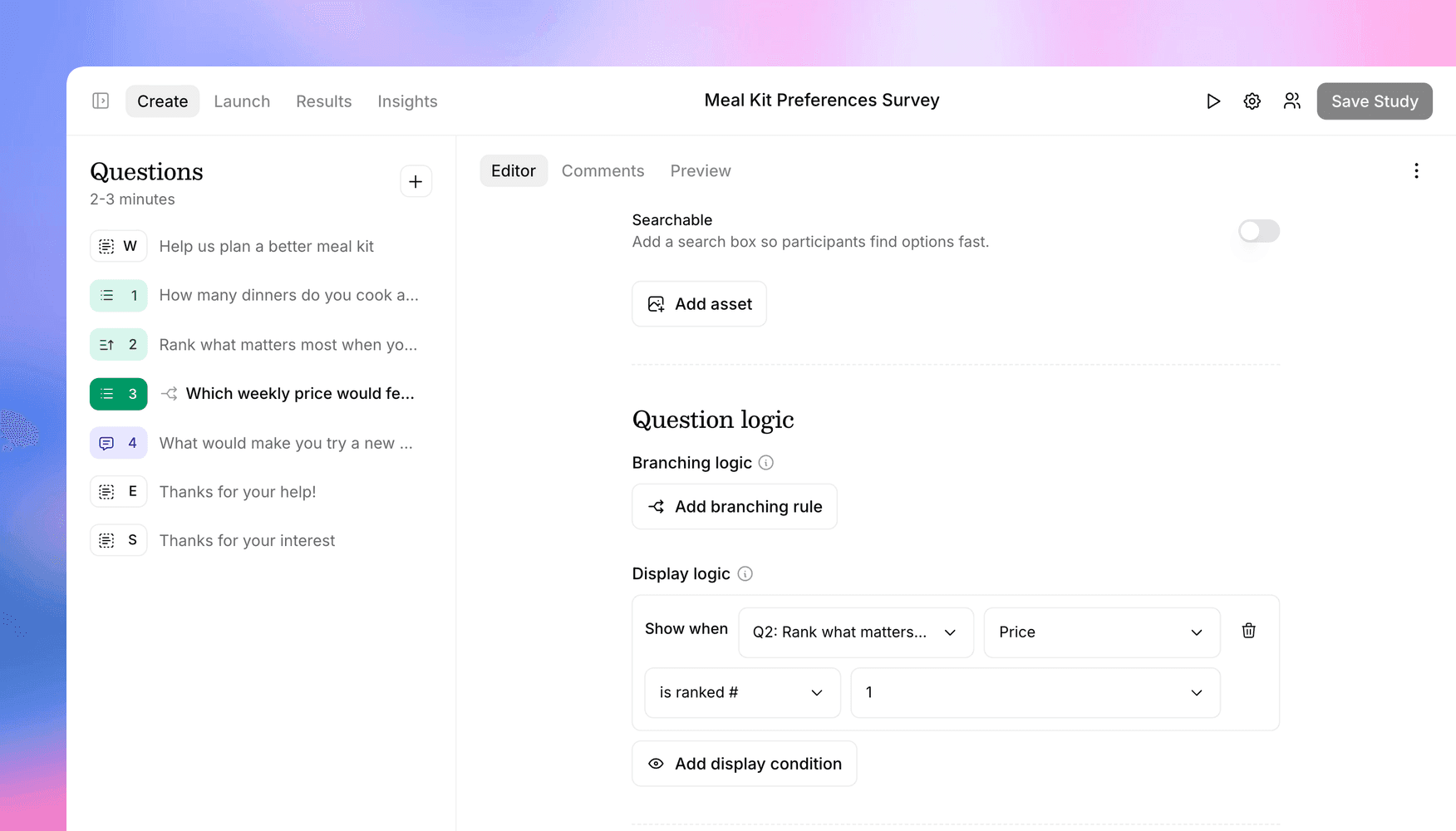
Now logic reads eight more types: Ranking (an option's position), Card Sort (the category a card went into), Matrix Rating Scale and Matrix Selection rows, Allocation (an option or the total), Matrix Allocation cells, Date (before, after, or between), and Media Upload (answered or not). Pick the item first, then the condition. On a meal kit survey, you can show "Which weekly price would feel fair?" only to people who rank Price first, and send people who rank Recipe variety first to a question about cuisines. Conditions on Ranking and Card Sort match in translated interviews too.
Logic on link parameters and quotas
Rules and display conditions can now also read the study link and your quotas, on any question type, AI questions included. A URL parameter condition reads a value from the link, so you can skip the screener for people who arrive with ?source=customers. A Quota condition checks whether a quota is full or still open, so once one group fills, the next people can take a different path instead of being screened out. The logic docs cover each condition.
Start a preview at any question
Checking question 30 of a long study used to mean clicking through the first 29. The preview bar now has Jump to question, which starts the preview at any question, and a bookmark that brings you back to the same question after you edit and publish. In the study editor, Preview from here in a question's ⋮ menu opens a preview at that question, and you can send the link to a teammate. Questions before the one you jump to count as unanswered, so answers piped from them show a placeholder like [Q2 answer].
Bigger edits with the Versive Assistant
The Versive Assistant now handles larger, multi-step changes. Paste a full questionnaire, even one with 60 questions, and it adds the whole thing in one go, including checks between the pasted questions like "Q3 can't be more than Q2". If one question can't be added, the Assistant adds the rest and tells you which one and why. New questions and groups land where you ask, inside a group when that's where they belong. When you ask it to change something in every question, it now checks each question's full text and options.
It also asks fewer questions before it builds. It only stops to check when it would otherwise guess a question's type or options, and when part of a request isn't supported, it builds the rest and tells you what it left out. You can create several Prolific panels in a row without typing "proceed" between them, and each Confirm card names the targeting it will use, like "Current U.S. state of residence: Colorado".
Faster folders
Opening a folder is quicker now, especially in workspaces with thousands of studies.
Prolific payments in billing history
Payments for Prolific panels now show under Billing history in your organization's plan settings, with an invoice to download, like Respondent panels and credit top-ups.
A webhook when a study fills
A new study.quota_filled webhook fires once when a study reaches its quota, so your systems can close a panel or alert the team without checking on the study. Subscribe to it under Connectors, alongside the interview events.
Free research tools
We added two free tools to our site: a card sorting tool for trying an open, closed, or hybrid sort in your browser, and an NPS, CSAT, and CES calculator that works through the formula with your numbers. When you want to run the same sort or survey with real participants, you can do it on Versive's Free plan.
Get in touch
We're always building. If you have any questions or feature requests, reach out to us at [email protected]. Want to get started? Sign up today and start running research in minutes.

Eric Li, Co-Founder, Versive