Introducing Qualtrics import: bring a survey over in one step
Turn a Qualtrics survey file into a Versive study, with its blocks, logic, quotas, and translations, and read a report of what carries over before anything is created.
If your team has years of surveys in Qualtrics, the hardest part of trying another tool is rebuilding them. A screener with skip logic, randomized blocks, and three languages can take a day to recreate by hand, and it's easy to miss a branch along the way.
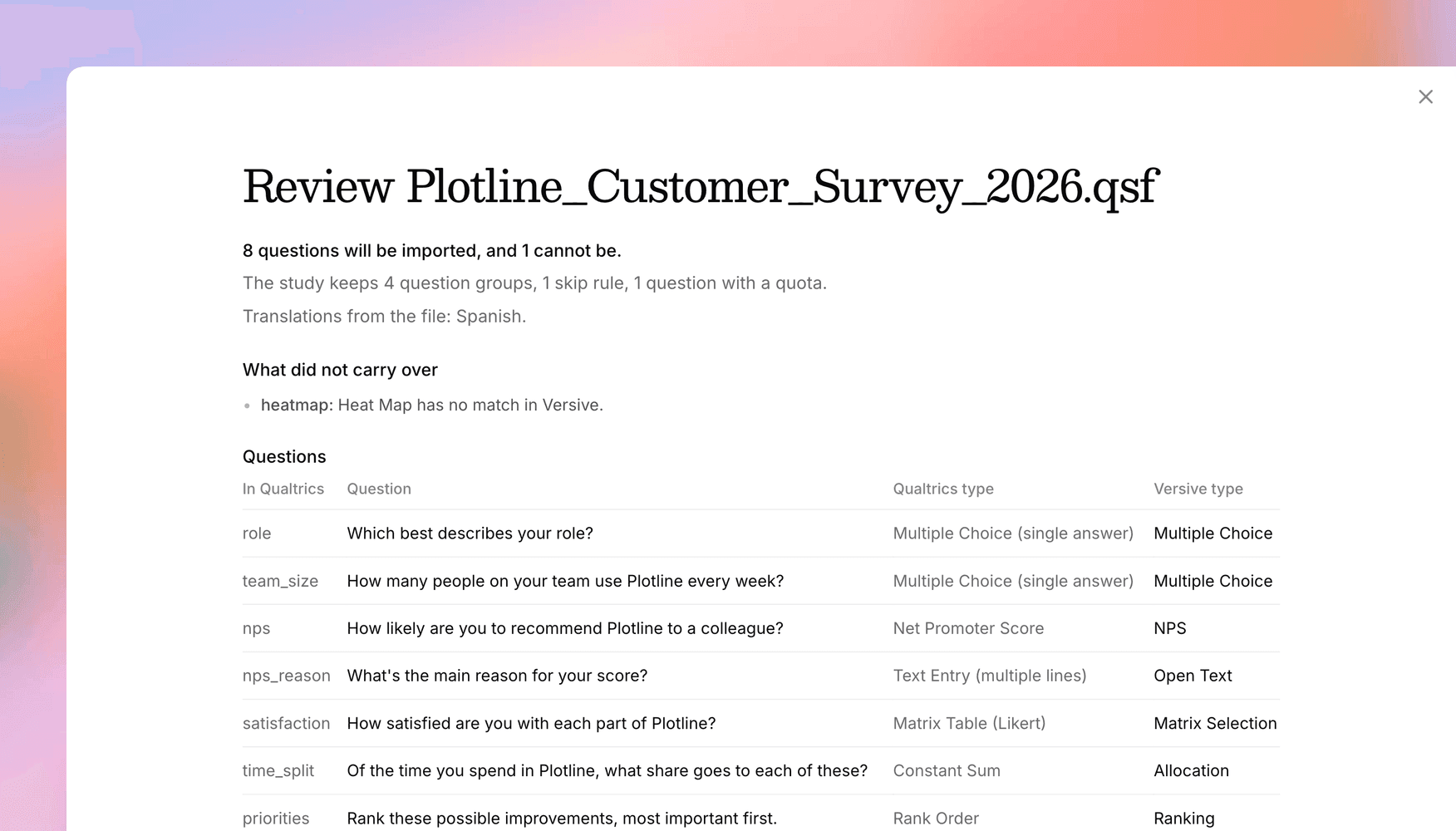
Now you can import it. Qualtrics import turns a Qualtrics survey file into a new Versive study, and before anything is created, it shows you a report of what each question becomes and what stays behind.
Your survey, structure included
Export the survey from Qualtrics as a .qsf file and upload it from Create > New project > Import a survey from Qualtrics. Questions come over as their closest Versive type: a Constant Sum becomes an Allocation question, a Rank Order becomes a Ranking, a matrix table becomes a Matrix Selection, and a text entry with email validation becomes an Email question. Option labels keep their text, and question text keeps its formatting and links.
The structure comes with it. Blocks become question groups, randomizers become Versive randomizers, and display logic, skip logic, and branches become display conditions and logic rules. Quotas on an option, answers piped into later questions, and the languages your survey offers carry over too.
Take a screener that ends the survey for anyone who doesn't manage a team and sends them back to Prolific with their ID. After the import, that's a logic rule that screens the participant out and redirects them, with {PROLIFIC_PID} filled in from the study link.
If you don't have the .qsf, a Word or text file in the Qualtrics Advanced Format works too. That's the tagged format Qualtrics uses for its own imports, and it carries questions, blocks, and page breaks, but no logic.
Read the report before you commit
The report lists every question with its Qualtrics type next to its new Versive type, and names everything that didn't carry over, such as a Heat Map question, an image inside question text, or a Loop & Merge block. You decide what to rebuild before the study exists. Click Continue to create it, open it in the editor to check the result, or click Undo import to remove it.
No AI runs during an import, so it uses no credits and works on every plan. The new study is a survey. On a plan with AI credits, you can switch it to an AI-moderated study later and add AI follow-ups to the questions you brought over.
Your plan's question limit applies, and the report tells you before anything is created. Versive doesn't keep the file you upload.
Other ways to import
You can also attach the file in the Versive Assistant and ask it to import the survey, ask an AI app connected over MCP for an upload link, or send the file to the import study endpoint. The moving from Qualtrics guide shows what every question type and survey element becomes.
Get in touch
We're continuing to build features that help you learn faster. If you have any questions or feature requests, reach out to us at [email protected]. Want to give it a try? Create a free account, no credit card required.

Eric Li, Co-Founder, Versive