What's new: plan and check studies in chat, recordings in AI apps, and more
The Versive Assistant and AI apps now plan a study with you and check it before you share it. AI apps can also run simulations, create participant links, and open interview recordings, and admins can turn off downloads of uploaded files.
A roundup of what we've shipped over the past week, headlined by a better way to build studies in chat.
Plan a study, then check it before you share it
When you ask the Versive Assistant or an AI app connected over MCP to create a study, it now starts with a plan: what you want to learn, who to talk to and how many, the questions it would ask, and an estimate of how long the interview will take. Nothing is created until you say the plan looks right. If you already have your questions, it skips the plan and builds them.
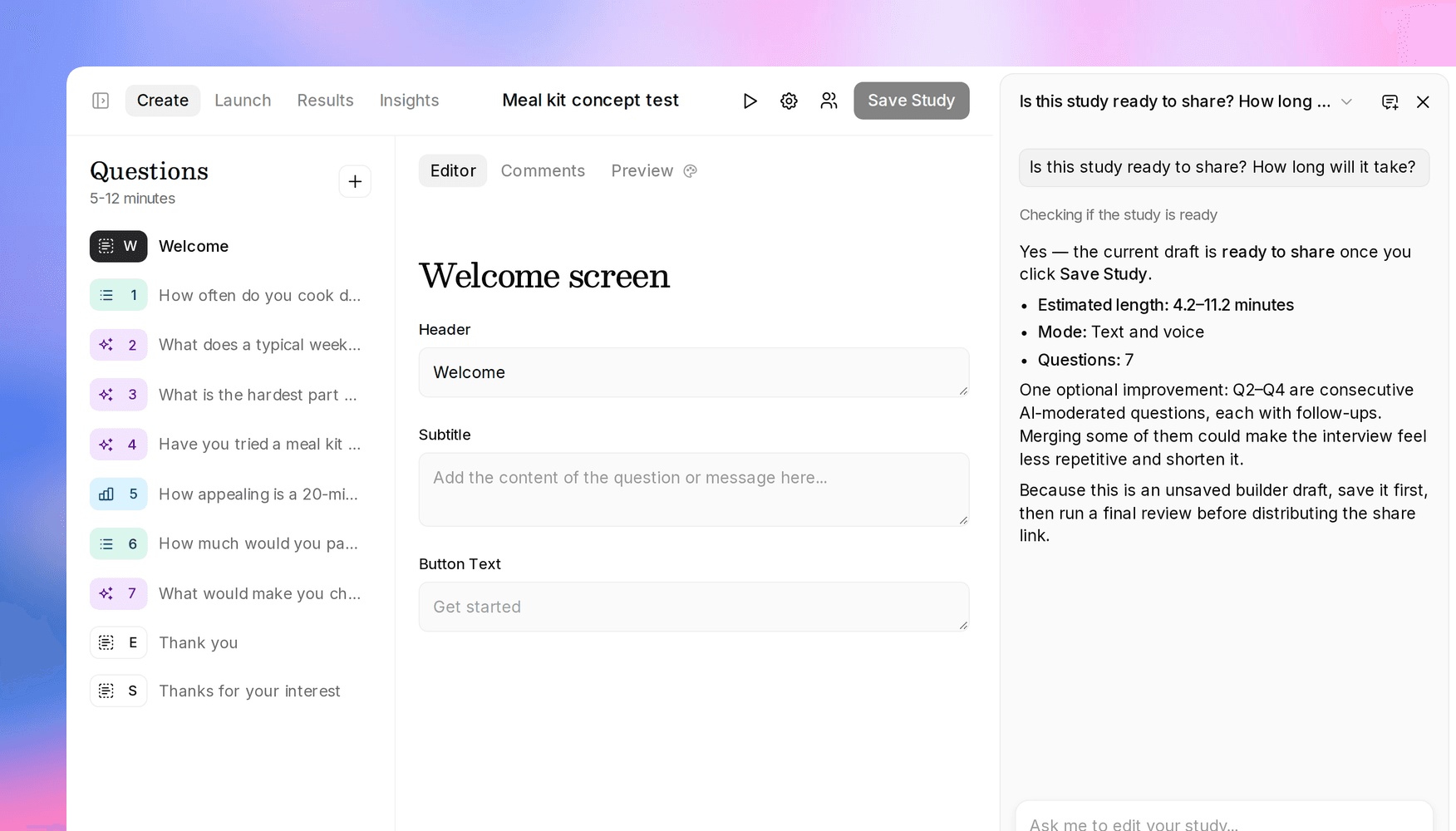
Once the study is built, the assistant runs a new study review before handing you the link. The review tells you whether participants can take the study yet and how long the longest path through it runs, and flags anything worth a second look:
- Blockers: the study is paused or archived, it has no questions, or a prototype task's goal screen is the same as its starting screen.
- Warnings: a question has no text, or the longest path runs past 30 minutes.
- Suggestions: the study runs past 15 minutes, uses prototypes, websites, card sorts, tree tests, or images without being limited to desktop, or has three or more AI questions in a row.
The assistant also reads your questions for wording, order, screening, and sample size, and suggests fixes for you to approve rather than making them on its own. In the builder, ask "Is this study ready to share?" at any point, and the review includes edits you haven't saved yet. Developers can run the same checks with the review study and estimate study length endpoints.
Recordings in AI apps
In October, the Assistant learned to pull up interview recordings as evidence. AI apps connected over MCP can now do the same. Ask Claude or ChatGPT for a participant's recordings and it gets links to their audio, screen recording, camera video, and uploaded files.
Each link works for 24 hours or 500 opens, whichever comes first, and stops working as soon as you disconnect the app. New connections include recordings by default. If you connected an app before this update, disconnect it and connect again to add them. Your role and each study's access settings still decide what an app can see.
Simulations, participant links, and email invites from AI apps
AI apps can now take a study from built to in the field. Ask for a test run and your app runs AI simulations with your saved personas, or with personas you describe, and their answers show up as simulated interviews next to real ones. Simulations use credits like real interviews and need a plan with AI credits, so Versive asks your app to show you the cost and wait for your yes, and refuses a run your credits can't cover. In the dashboard, the Simulate tab now also shows how many credits a run needs before you start it.
When you're ready for real participants, your app can create a private interview link for each person on a list you give it, and draft email invite templates with merge fields like the participant's first name and their link. Sending stays with you: pick the template on the study's Send tab and send it yourself. As with recordings, an app connected before this update needs to reconnect to get these tools. The MCP tools reference lists them all.
Turn off downloads of uploaded files
Some files shouldn't leave Versive, like an unreleased concept image on a question or the files participants upload. Owners and admins can now turn off Allow downloading uploaded files under Organization > Settings. With it off, people can still see those files in Versive, but the download buttons are gone, the dashboard doesn't offer to save uploaded images, and the API and AI apps get no links to them. Recordings, transcripts, and exports aren't affected.
It removes Versive's ways to download these files rather than locking them down completely: anything shown in a browser can still be saved by the person looking at it, and public sharing links keep working until you revoke them. The uploaded file downloads docs list exactly what changes.
More of the dashboard in AI apps and the API
We went through what the dashboard can do that the API and MCP couldn't, and closed most of the gaps:
- AI apps can now set the device requirement, screen recording, interviewer guidelines, rephrasing, memory, and more, and can pipe earlier answers into question text.
- Studies created through the API or an AI app start with the same interviewer settings as studies created in the dashboard.
- Question groups now work on new studies created through the API and MCP. Numeric branching rules ("greater than", "less than") set up through the API, the Assistant, or MCP now fire as expected, and question quotas follow an option when it's renamed there.
Batch question updates you can safely retry
For teams building studies through the API: the batch questions endpoint now returns new question IDs in the order you sent the questions, accepts an optional Idempotency-Key so a retried request doesn't create the same questions twice, and takes up to 500 questions per request. Errors also say which item in the batch they're about.
Get in touch
We're always building. If you have any questions or feature requests, reach out to us at [email protected]. Want to get started? Sign up today and start running research in minutes.

Eric Li, Co-Founder, Versive