Introducing Text Highlight and Image Click: see the exact words and spots people react to
Test copy and designs with two new question types. Participants highlight the words they like or doubt in a message, or click where they would tap on an image, and Insights show which parts got the most reactions.
Ask people what they think of an ad and you get a general impression. It sounds good, or it sounds like a lot, and you're left guessing which line did it. Designs have the same problem: "Was it clear where to go?" tells you less than seeing where people would actually click.
Two new question types let participants show you exactly what they mean. Text Highlight lets them mark the words they like or doubt in a passage. Image Click lets them click spots on an image, for a first-click test or a heat map.
Text Highlight
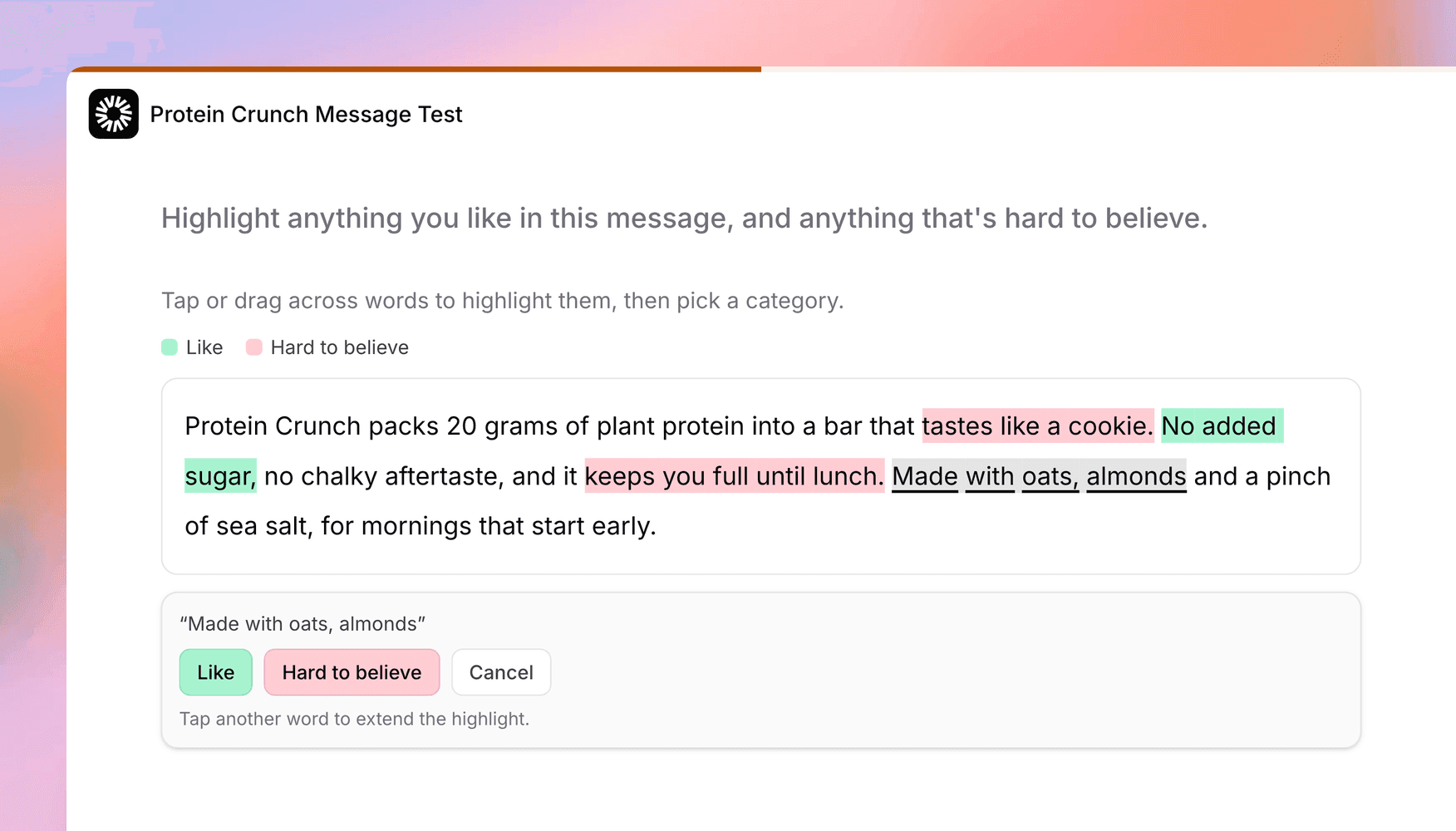
Say you're testing the launch copy for a protein bar. Add a Text Highlight question (under Ratings & Feedback), paste the message, and ask "Highlight anything you like in this message, and anything that's hard to believe." Name the categories, in this case "Like" and "Hard to believe". You can add up to eight and cap how many highlights each person makes.
Participants select whole words by dragging on a computer, or by tapping the first and last word on a phone, then pick a category. One person marks "No added sugar" as something they like and "tastes like a cookie" as hard to believe. Tapping a highlight changes its category or removes it.
Insights shade the passage by how many participants highlighted each word, one category at a time, and list the ten phrases highlighted most in each. Switch to "Hard to believe" and you see at a glance which claims people doubt. Transcripts list each person's highlights by category, and the CSV export has a column per category.
You can use the answers elsewhere in the study. Show a follow-up only to people who highlighted as "Hard to believe", or filter your results to them. Turn on AI follow-ups and the interviewer asks about the exact phrases each person marked. A later question can quote them back, too: "You marked 'tastes like a cookie' as hard to believe. What would make it more convincing?"
Image Click
Image Click puts the same idea on a picture. Add one image, like a screenshot of your app's home screen, and ask "Where would you tap to change your delivery day?" With the click limit at 1, it's a first-click test. Raise the limit (up to 20) and add tags such as Like and Dislike, and you get a heat map of the parts people react to, tag by tag.
You can also draw regions on the image, such as the menu or the price. Participants never see them. Insights show a heat map of the clicks, for all of them or one tag at a time. They also show the share of participants who clicked each region and the median time to the first click, so you can see whether people found the right spot and how long it took. If you draw or move regions after responses come in, Insights recount the clicks. The CSV export has every click and a column per region.
When to use them
Text Highlight is the one for words, like ad copy, packaging claims, or a pricing page. Reach for Image Click when you want to know where people look or tap, like a first-click test on a new navigation.
In multi-language studies, Versive translates the passage and categories with the rest of the study, and Image Click can use a different version of the image for each language. The Versive Assistant and MCP can add both types for you, and you draw Image Click regions in the study editor. Image Click answers don't drive logic or filters yet, and AI personas skip both types in simulations. The question types docs have every setting.
Get in touch
We're continuing to build features that help you learn faster. If you have any questions or feature requests, reach out to us at [email protected]. Want to give it a try? Start a free trial and start running research in minutes.

Eric Li, Co-Founder, Versive