What's new: Matrix Allocation, checks against earlier answers, and more
Split a budget across several scenarios in one question, check numbers against earlier answers, give the AI interviewer background on your study, steer what Memory learns, time exploratory answers, and run faster AI tests.
A roundup of what we've shipped over the past two weeks, headlined by new ways to collect numbers you can trust.
Matrix Allocation
An Allocation question asks a participant to split a total across options, like what share of their budget goes to each vendor. Often you need that split more than once: today and a year from now, or for new patients and for existing ones. Until now, that meant repeating the same Allocation question for every scenario.
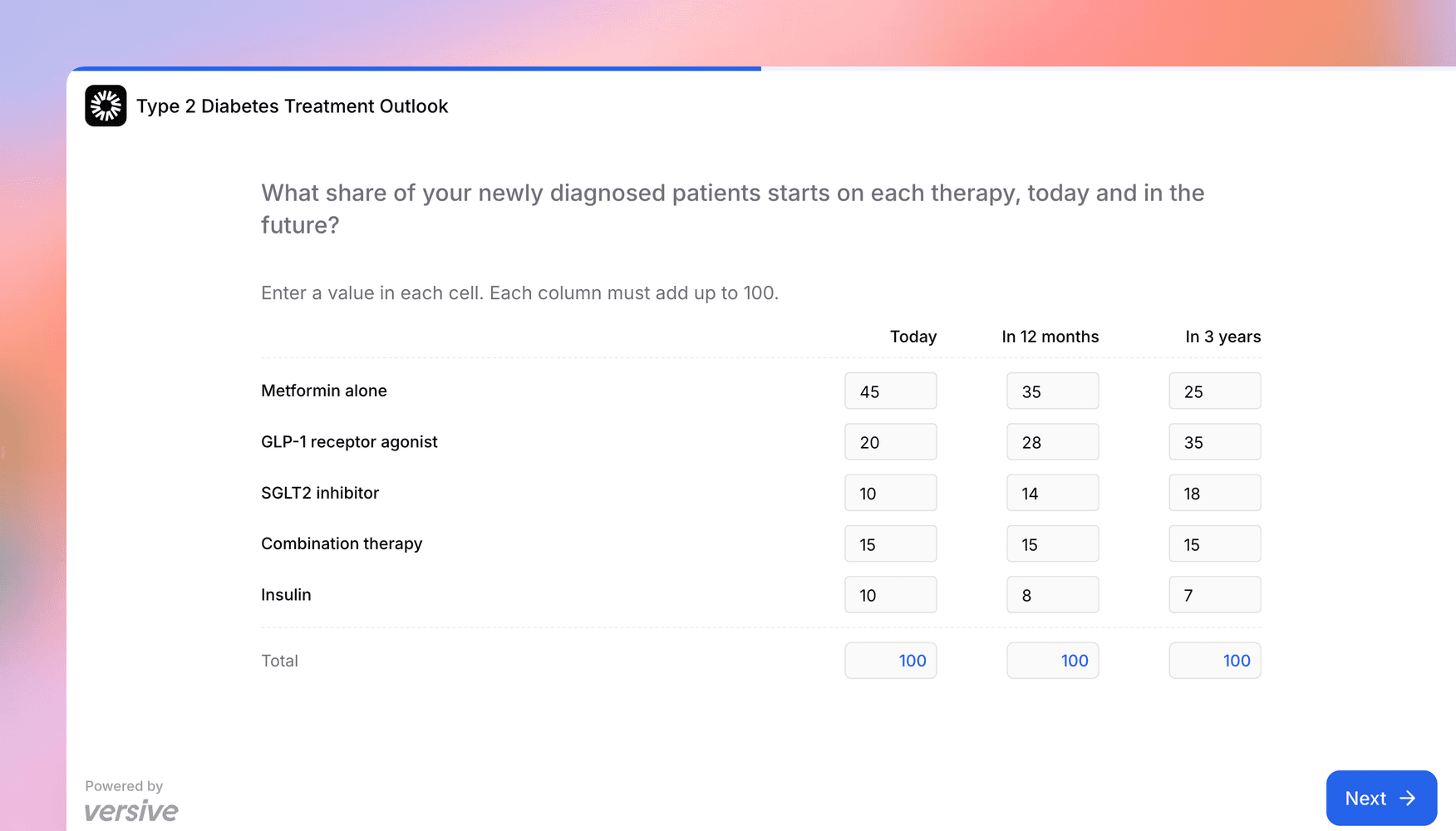
Matrix Allocation puts it in one grid. Rows are the things being split, columns are your scenarios or time points (up to eight), and each column is filled in on its own. Ask "What share of your newly diagnosed patients starts on each therapy?" with columns for today, 12 months out, and three years out, and you get all three splits from one question.
- Totals per column: with Has allocation limit on (the default), every column must add up to your total (100 unless you change it), and participants see a live total under each column as they type.
- Independent values: turn the limit off and each cell is its own number, with an optional maximum per option that caps every cell.
- Results per column: insights show each column as its own chart, table, or pie chart, and the CSV, PDF, and Markdown exports include every cell.
Rows can be randomized, and Matrix Allocation works in the builder, with the Versive Assistant, through the API, and over MCP.
Checks against earlier answers
Surveys that collect counts tend to collect contradictions. A participant says they see 40 patients a week, then says 55 of them started a new treatment this week. A range check on a single question can't catch that, because the limit depends on an earlier answer.
Number and Allocation questions can now be checked against earlier answers. Turn on Checks against earlier answers on the question card, pick an earlier Number answer or Allocation option, and choose the comparison (less than, at most, equal to, at least, or greater than). For example:
- "Patients who started treatment this week" must be at most "patients you see in a week."
- An age-group Allocation must add up to exactly the number of patients from an earlier question.
Participants see the limit as a hint ("Enter a number 40 or less") and can't move on while an answer fails a check. If they go back and change the earlier answer, the check updates with it. The builder flags a check that stops making sense after an edit, like one that points at a deleted question, and simulated interviews follow the same rules. Number answers can now also be @-mentioned in later questions, so you can show the earlier value right in the question text. The question type docs cover every combination.
More flexible Allocation questions
Two new settings for the regular Allocation question:
- Maximum per option: some questions don't split a single total. "What share of your patients has each of these conditions?" can add up to more than 100%, since one patient can have several. Turn off the allocation limit, set a maximum like 100, and each option becomes its own percentage.
- Participant-added options: let participants add options you didn't list, each with a name and a value. Their values count toward the total, duplicate names are refused, and the added options show up in insights and CSV exports.
Give the interviewer background with study context
The AI interviewer asks better follow-ups when it knows what your study is about. Add up to 3,000 characters of study context under Settings > AI Interviewer: background on your product, your audience, or the terms participants will use. For example: "We're studying how small business owners use our invoicing tool. Most participants handle billing themselves and send fewer than 20 invoices a month."
Study context shapes follow-up questions and exploratory openings in text and voice interviews. It stays on our servers and is never sent to participants.
Steer what Memory learns
Memory, the setting that lets the interviewer learn from completed interviews, is out of beta and has its own Settings > Memory tab with two new controls:
- Memory focus: tell it what to pay attention to, like "Capture price sensitivity and the reasons behind it; ignore feedback about the app."
- Rules for using it: tell the interviewer how to use what it has learned, like "Don't bring up competitors unless the participant mentions them first."
The same tab shows what the interviewer has learned so far, grouped by question, to anyone on your team who can see the study's results.
Timers on exploratory questions
Exploratory questions now support the same duration tracker as AI questions. Participants see a timer that's yellow below your minimum, green in range, and red at your maximum. Follow-up answers get their own targets, and reaching the maximum shows a reminder to wrap up instead of cutting the participant off. Use it when you're after answers of a certain length, like a two-minute story about the last time a project went sideways.
Faster, better AI tests
We upgraded the AI behind AI tests, and measured the difference on real tests before switching. Design tests now run about three times faster: a typical run dropped from about seven minutes to under two and a half, and in blind side-by-side comparisons, an AI judge preferred the new interviews about 7 times out of 10. Website tests get the upgrade too, and the same kind of comparison preferred the new runs 95% of the time.
There's nothing to change on your side: every new AI test uses the upgrade.
Get in touch
We're always building. If you have any questions or feature requests, reach out to us at [email protected]. Want to get started? Sign up today and start running research in minutes.

Eric Li, Co-Founder, Versive