What's new: display logic, default study branding, and more
Show a question only to the participants it applies to, give every new study your logo and brand color, load AI-built prototypes instantly, get clearer CSV exports, and more.
A roundup of what we've shipped over the past few weeks, headlined by a new kind of question logic.
Display logic
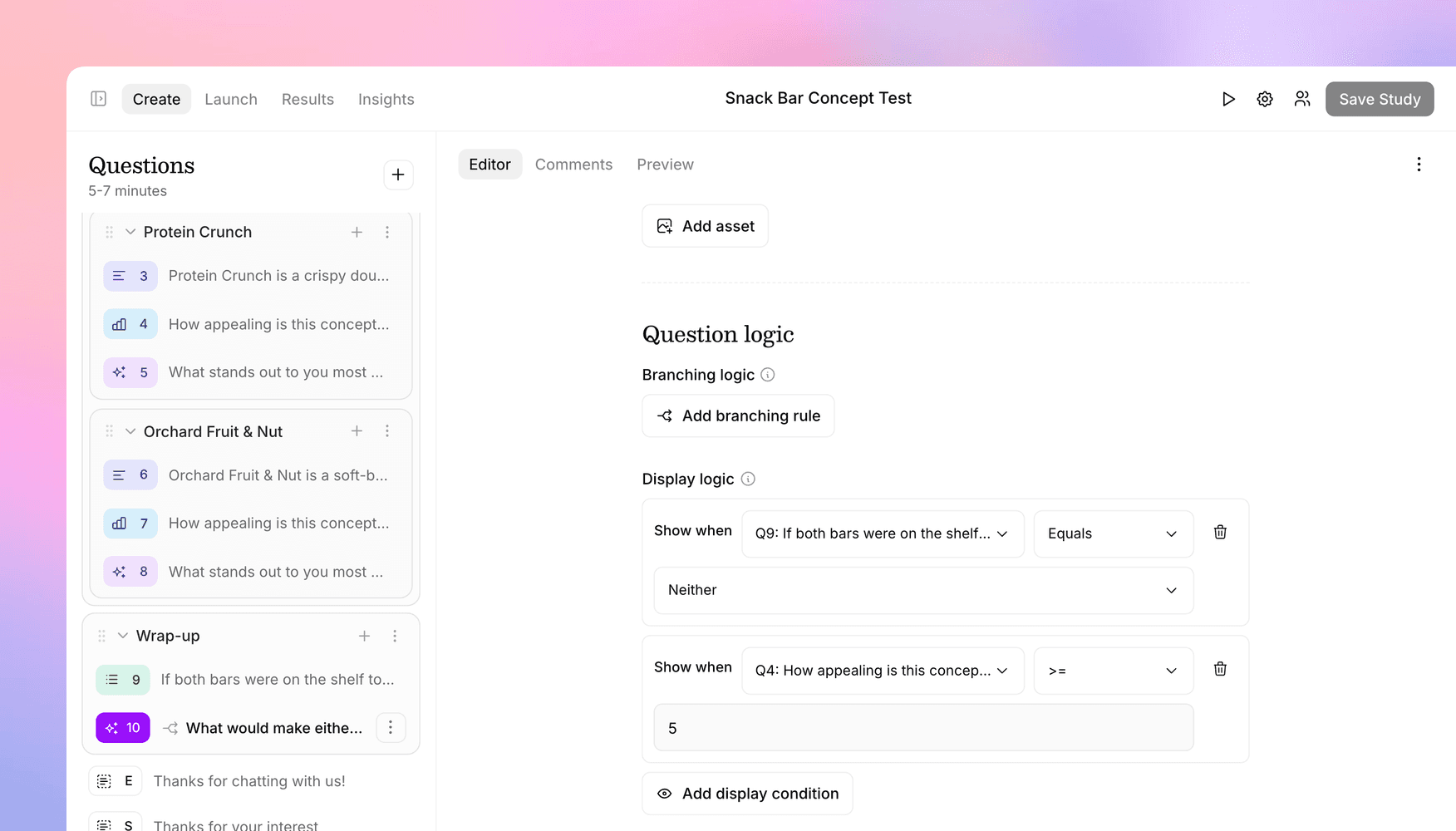
Branching decides where an interview goes next. Display logic decides whether a question is shown at all. Add a display condition to any question, pick an earlier question as the source, and set a condition on its answer. The question only appears for participants who meet every condition, and everyone else moves on to the next question that applies to them.
That makes it easy to target a question at a narrow group. In a concept test, for example, you can ask "What would make either of these a must-buy for you?" only of people who rated a concept 5 or higher but still said they'd buy neither. Branching alone can't express that cleanly, because it depends on two answers given at different points in the study.
- Structured answers: conditions work on multiple choice (equals, includes, fewer than N selections), and on rating scale, NPS, star rating, and number answers (equal to, greater than, less than).
- Open-ended answers: write the condition in plain language, like "mentions price as a concern," and AI evaluates each participant's answer. It runs as soon as the participant moves past the source question, so later questions don't wait on it. If an evaluation ever fails, the question is shown rather than silently skipped.
- Works with branching: branching picks the next question, then display conditions decide whether it's shown. If every remaining question is hidden, the interview ends with your thank-you message.
- Everywhere your study runs: display logic works in text and voice interviews, and the Versive Assistant can set up conditions for you.
The editor flags conditions that stop making sense after an edit, like a source option that was renamed or a source question moved after the question it controls, and won't save the study until they're fixed. The logic docs cover the details.
Default branding for new studies
If your team puts its logo and brand color on every study, you no longer have to set them one study at a time. Owners and admins can now set study defaults under Organization > Settings: a default logo and primary color that every new study starts with, whether it's created from the dashboard, through the API, or by the Assistant.
Defaults are copied in when a study is created, so changing them later leaves existing studies alone, and a study created from a template or duplicated from another keeps its source's branding. Each study can still change its branding in its Branding tab, which now also has a Remove button for the logo.
Prototypes that load instantly
Published prototypes from Figma Make, v0, Lovable, Bolt, Replit, and Framer now load directly inside the interview, whether you use them in a website test or embed them in a question. There's no remote browser session to spin up, so they appear right away.
Point the task at the prototype's published link (your .lovable.app or .vercel.app URL, for example). If you paste an editor or chat link instead, the builder tells you what to use, and a built-in preview lets you check the prototype isn't behind a login before participants see it. Other websites keep using the remote browser from website testing, as before.
Clearer CSV exports for grouped studies
If your study repeats the same questions across several concepts, the CSV export now tells the columns apart:
- Group titles in headers: a question inside groups is prefixed with them, like
3. Concepts › Concept B › How appealing is this? - Media file names in headers: questions with an attached image or video include its file name, like
[concept-b.png] - Order shown: each randomized group gets a column recording the order that participant saw its contents in, like
Concept B|Concept C|Concept A, separated by pipes so it splits cleanly in a spreadsheet
Duplicate question groups
You can now duplicate a whole question group or subgroup from its "…" menu. The copy includes everything inside it, and @-mentions and skip logic within the group point at the copied questions rather than the originals. It's the fastest way to build a concept test where every concept gets the same set of questions.
Size inline images and videos
Inline images and videos have a new Max width setting: full width by default, or anywhere from 10% to 90% of the question column. It keeps tall or portrait media from pushing the answer options off the screen on phones.
More for MCP and the API
Two additions to the Versive MCP server, both also available in the public API:
- Randomizers: your agent can now list, create, edit, and remove randomizers, the building block of split tests. Ask Claude to set up an A/B test of two concept descriptions, or to simplify a study by removing a split test while keeping its questions.
- Help center search: new
search_docsandread_doctools let your agent look up how Versive works in our documentation, the same way the Versive Assistant does, instead of guessing.
Get in touch
We're always building. If you have any questions or feature requests, reach out to us at [email protected]. Want to get started? Sign up today and start running research in minutes.

Eric Li, Co-Founder, Versive